Plugin System
Every import source, enrichment provider, and acquisition target in Kombiner is implemented as a plugin — a small Rhai script paired with a plugin.toml manifest. Plugins run in a sandboxed environment with access to a rich host API for HTTP, browser automation, database access, and filesystem scanning.
Plugin Anatomy
Each plugin lives in its own directory and contains exactly two files:
my-plugin/
├── plugin.toml   ← manifest: name, stage, settings
└── main.rhai     ← Rhai script with the entry point function
plugin.toml
The manifest declares the plugin’s identity and its user-configurable settings:
[plugin]
name        = "spotify-import"
version     = "0.2.1"
stage       = "import"
description = "Import Spotify library"
browser     = true

[settings]
email = { type = "string", label = "Email", default = "" }
| Field | Description |
|---|---|
name | Unique identifier. Used to namespace database records. |
version | Semver string shown in the UI. |
stage | One of import, enrich, or acquire. |
description | Short human-readable summary. |
browser | true to enable browser automation (headless Chromium). Omit or false otherwise. |
Each key under [settings] becomes a field in the plugin’s configuration UI. Supported types are string, password (masked input), and number.
main.rhai
The script runs as top-level code — there is no entry point function to define. Kombiner executes the entire file each time the plugin is invoked, with stage-specific variables pre-injected into the script’s scope (see Entry Points below). It can call any host API function that falls within its declared permissions.
The Three Stages
Kombiner’s pipeline has three stages. Each plugin belongs to exactly one.
| Stage | Injected variables | Called when | Typical use |
|---|---|---|---|
| import | (none) | On schedule, continuously | Pull tracks from a streaming service or local folder |
| enrich | track map | Once per track | Look up BPM, key, genre, label from an external source |
| acquire | track map | For each track in the acquire cart | Download the audio file |
Permissions Model
Plugins receive only the permissions they need. The plugin.toml manifest implicitly grants permissions based on stage; additional capabilities require the browser flag.
| Permission | Who has it | How it’s granted |
|---|---|---|
| Database read/write | All plugins | Always available |
| HTTP | All plugins | Always available |
| Browser automation | Plugins with browser = true | Set browser = true in manifest |
| Filesystem scan | Import/acquire plugins that need it | Always available (reads only specified paths) |
| Cursor (import state) | Import plugins only | Available only in import stage |
Plugins cannot spawn subprocesses, call native FFI, or use eval(). The Rhai engine is hardened against these vectors.
Host API Reference
All host API functions are available as plain global calls inside main.rhai.
Logging
| Function | Description |
|---|---|
log(msg) | Log at the default level |
log_info(msg) | Log at info level |
log_warn(msg) | Log at warning level |
log_error(msg) | Log at error level |
Progress and Utilities
| Function | Description |
|---|---|
set_progress(current, total) | Update the progress bar in the UI |
now() | Return current time as a Unix millisecond timestamp |
get_setting(key) | Return the user-configured value for a settings key |
Cursor (import plugins only)
Cursors let import plugins remember where they left off between scheduled runs.
| Function | Description |
|---|---|
get_cursor(key) | Retrieve a previously saved cursor value, or () if unset |
set_cursor(key, value) | Persist a cursor value for the next run |
Database
| Function | Description |
|---|---|
db_find_track(plugin_id, source_id) | Look up a track by plugin namespace and source-side ID. Returns a track map or (). |
db_upsert_track(map) | Insert or update a track. Returns a map of the saved track — use result["id"] to get the internal ID. |
db_get_tracks(filter) | Return an array of tracks matching the filter map. |
track_add_link(track_id, service_name, url) | Attach a streaming or purchase link to a track. |
track_add_enrichment(track_id, result_map) | Record enrichment data (BPM, key, label, etc.) on a track. |
HTTP
| Function | Description |
|---|---|
http_get(url) | Send a GET request. Returns the response body as a string. |
http_post(url, body) | POST with a plain string body. |
Browser (requires browser = true)
The browser API controls a headless Chromium tab that is created at the start of each plugin run and destroyed when it ends.
| Function | Stable | Description |
|---|---|---|
_browse(url) | Yes | Navigate to a URL |
_refs(selector) | Yes | Return an array of element references matching a CSS selector |
_ref(selector, timeout?) | Yes | Return a single element reference, optionally waiting for it |
_get(ref, property) | Yes | Read a DOM property from an element reference |
browser_wait_element(selector, timeout) | No | Wait until a CSS selector matches, up to timeout ms |
browser_click(selector) | No | Click an element by CSS selector |
browser_type(selector, text) | No | Type text into an input element |
browser_fill(selector, text) | No | Fill an input field (clears first) |
browser_press(key) | No | Press a keyboard key (e.g. "Enter") |
browser_keyboard_type(text) | No | Type raw text via keyboard simulation |
browser_select(selector, value) | No | Choose a dropdown option by value |
browser_find_text(text, action, selector?) | No | Find an element by its visible text and optionally click it or read it |
browser_find_testid(testid, action) | No | Target an element by data-testid attribute |
browser_find_regex(pattern, action, selector?) | No | Find element whose text matches a regex |
browser_eval(js_code) | No | Execute arbitrary JavaScript and return the result |
browser_get_url() | No | Return the current page URL |
browser_get_title() | No | Return the current page title |
browser_get_cookies() | No | Return all cookies as an array |
browser_set_cookies(cookies) | No | Set cookies for the current session |
browser_clear_cookies() | No | Clear all cookies for the current session |
browser_save(track) | No | Save the most recently downloaded file and link it to the given track |
browser_prompt() | No | Show the browser window to the user for manual interaction (CAPTCHA, 2FA) |
execute_with_permutations(track, fn) | No | Retry fn(title, artists_variant) with common artist name variations; return () from fn to try the next permutation |
normalize_text(str) | No | Return a lowercase, punctuation-stripped version of a string for comparison |
Browser set cookies cookie object fields
| Field | Description |
|---|---|
name | Name of the cookie |
value | Value of the cookie |
domain | Domain for which the cookie is valid |
path | Path for which the cookie is valid |
secure | Whether the cookie should only be sent over HTTPS |
http_only | Whether the cookie should only be accessible via HTTP(S) requests |
same_site | Whether the cookie should only be sent with requests from the same site |
expires | Expiration date of the cookie |
Filesystem
| Function | Description |
|---|---|
scan_directory(path, extensions) | Recursively list files under path whose extension is in the array. Returns an array of absolute file paths. |
Entry Points
All stages run as top-level script code. Kombiner injects variables into the script’s scope before executing it.
Import
Called on a schedule (default: disabled). No variables are injected. Must be idempotent and use cursors to track progress so it can resume after interruption.
let cursor = get_cursor("last_count");
// ... fetch and upsert tracks ...
set_cursor("last_count", new_count.to_string());
Enrich
Called once per track. The track map is injected automatically. Should call track_add_enrichment with any data found.
let result = http_get("https://api.example.com/lookup?isrc=" + track["isrc"]);
track_add_enrichment(track["id"], #{ bpm: result.bpm, key: result.key });
Acquire
Called for each track in the acquire cart. The track map is injected automatically. Responsible for downloading the file and calling browser_save to link it.
Sandboxing and Safety
Plugins run inside a restricted Rhai engine:
- Operation limit: 10 million operations per run. Long-running loops will be cut off.
- Call depth limit: 32 nested function calls.
- No
eval(), no FFI, no subprocess spawning. - Browser isolation: Each browser-capable plugin run gets a fresh Chromium tab that is destroyed on completion. All cookies and local storage persist between runs.
If a plugin exceeds its operation limit or timeout, the run is terminated and an error is logged. The cursor state from the last successful set_cursor call is preserved, so the next run picks up where it left off.
Installing Plugins
Kombiner ships with a set of bundled plugins that cover the most common sources and services. To install an additional plugin:
- Go to Settings → Plugins.
- Click Plugins folder and put the plugin directory (the folder that contains
plugin.toml) into the designated location. - Click Refresh to validate the manifest and reload the plugin list.
Plugin Progress and Logs
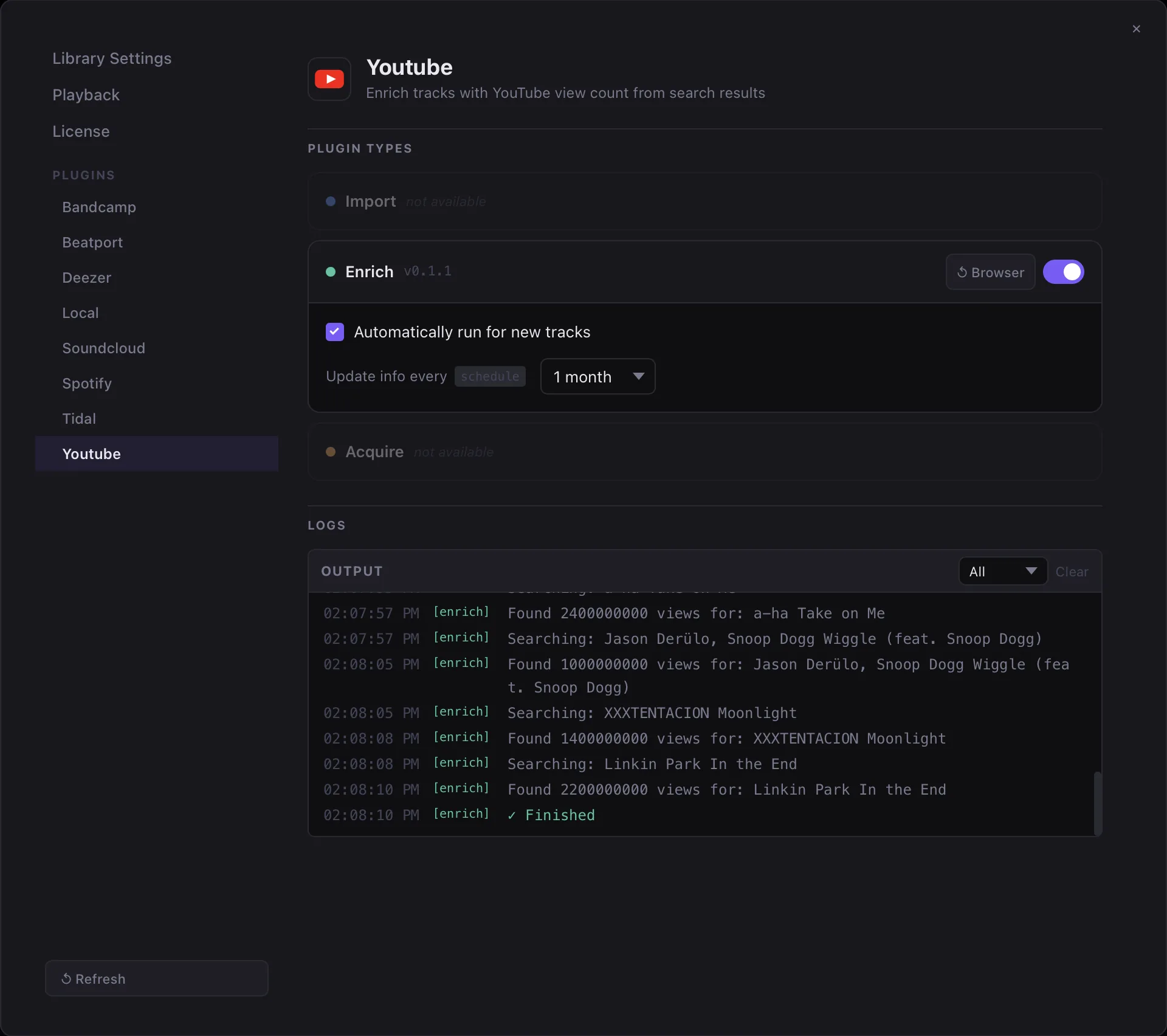
While a plugin is running, its progress and log output are visible in Settings → Plugins → [Plugin Name]. The progress bar reflects the last set_progress(current, total) call, and all log_* messages appear in the log panel in real time.
Writing Custom Plugins
Any developer familiar with Rhai can write a Kombiner plugin. The language is a superset of a simple scripting syntax close to JavaScript. Create a plugin.toml and a main.rhai with the correct entry point, install the folder through Settings, and your plugin will appear in the pipeline alongside the built-in ones.
See Writing Plugins for a step-by-step guide, including a minimal import plugin template and best practices for cursor management.